 ZENDER
IDEA编译Spring5源码
1、配置本地gradle,设置国内仓库
提前下载Spring源码中gradle/wrapper/gradle-wrapper.properties文件中distributionUrl所对应的gradle版本。然后解压好让idea使用本地的gradle。
distributionBase=GRADLE_USER_HOME
distributionPath=wrapper/dists
distributionUrl=https\://services.gradle.org/distributions/gradle-6.8.3-bin.zip
zipStoreBase=GRADLE_USER_HOME
zipStorePath=wrapper/dists
idea配置gradle的配置。
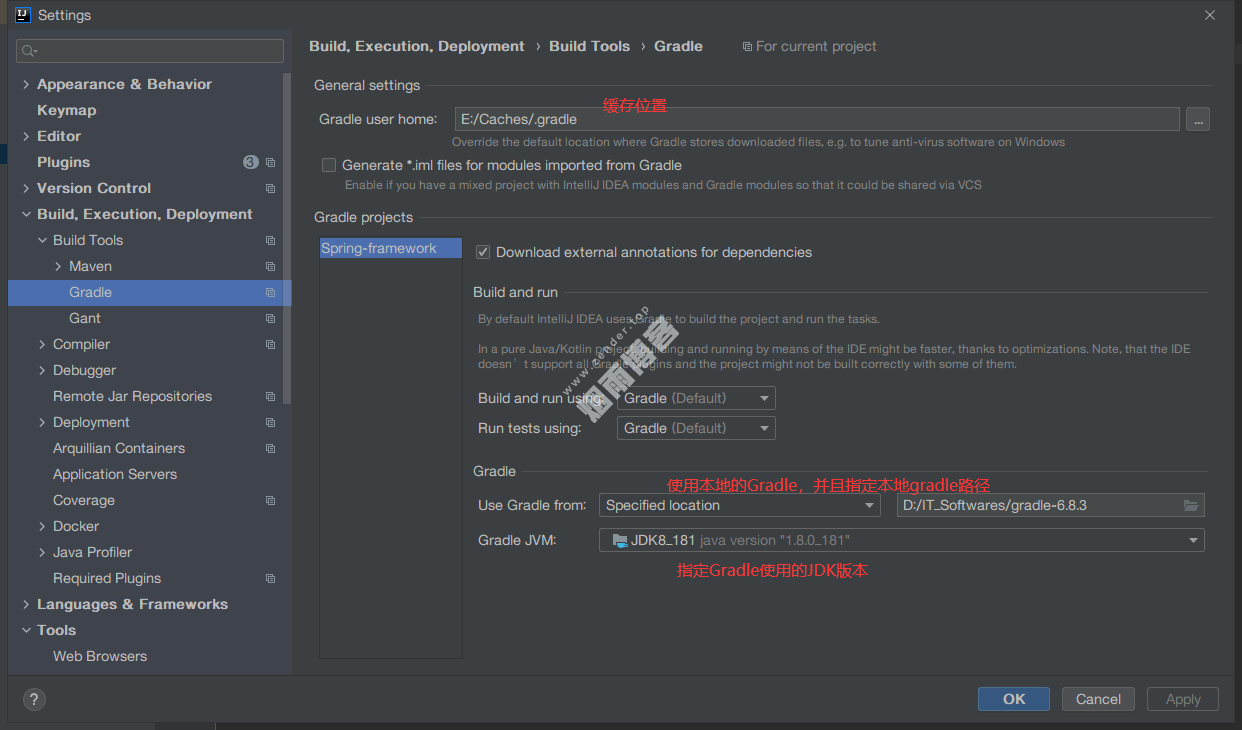
build.gradle里面的repositories中,添加阿里云国内的gradle仓库。
maven { url 'https://maven.aliyun.com/repository/public' }或者在gradle的缓存目录.gradle中添加一个init.gradle文件,全局替换gradle的仓库为国内的仓库,内容如下:
gradle.projectsLoaded {
    rootProject.allprojects {
        buildscript {
            repositories {
                def JCENTER_URL = 'https://maven.aliyun.com/repository/jcenter'
                def GOOGLE_URL = 'https://maven.aliyun.com/repository/google'
                def NEXUS_URL = 'http://maven.aliyun.com/nexus/content/repositories/jcenter'
                all { ArtifactRepository repo ->
                    if (repo instanceof MavenArtifactRepository) {
                        def url = repo.url.toString()
                        if (url.startsWith('https://jcenter.bintray.com/')) {
                            project.logger.lifecycle "Repository ${repo.url} replaced by $JCENTER_URL."
                            println("buildscript ${repo.url} replaced by $JCENTER_URL.")
                            remove repo
                        }
                        else if (url.startsWith('https://dl.google.com/dl/android/maven2/')) {
                            project.logger.lifecycle "Repository ${repo.url} replaced by $GOOGLE_URL."
                            println("buildscript ${repo.url} replaced by $GOOGLE_URL.")
                            remove repo
                        }
                        else if (url.startsWith('https://repo1.maven.org/maven2')) {
                            project.logger.lifecycle "Repository ${repo.url} replaced by $REPOSITORY_URL."
                            println("buildscript ${repo.url} replaced by $REPOSITORY_URL.")
                            remove repo
                        }
                    }
                }
                jcenter {
                    url JCENTER_URL
                }
                google {
                    url GOOGLE_URL
                }
                maven {
                    url NEXUS_URL
                }
            }
        }
        repositories {
            def JCENTER_URL = 'https://maven.aliyun.com/repository/jcenter'
            def GOOGLE_URL = 'https://maven.aliyun.com/repository/google'
            def NEXUS_URL = 'http://maven.aliyun.com/nexus/content/repositories/jcenter'
            all { ArtifactRepository repo ->
                if (repo instanceof MavenArtifactRepository) {
                    def url = repo.url.toString()
                    if (url.startsWith('https://jcenter.bintray.com/')) {
                        project.logger.lifecycle "Repository ${repo.url} replaced by $JCENTER_URL."
                        println("buildscript ${repo.url} replaced by $JCENTER_URL.")
                        remove repo
                    }
                    else if (url.startsWith('https://dl.google.com/dl/android/maven2/')) {
                        project.logger.lifecycle "Repository ${repo.url} replaced by $GOOGLE_URL."
                        println("buildscript ${repo.url} replaced by $GOOGLE_URL.")
                        remove repo
                    }
                    else if (url.startsWith('https://repo1.maven.org/maven2')) {
                        project.logger.lifecycle "Repository ${repo.url} replaced by $REPOSITORY_URL."
                        println("buildscript ${repo.url} replaced by $REPOSITORY_URL.")
                        remove repo
                    }
                }
            }
            jcenter {
                url JCENTER_URL
            }
            google {
                url GOOGLE_URL
            }
            maven {
                url NEXUS_URL
            }
        }
    }
}
2、编译
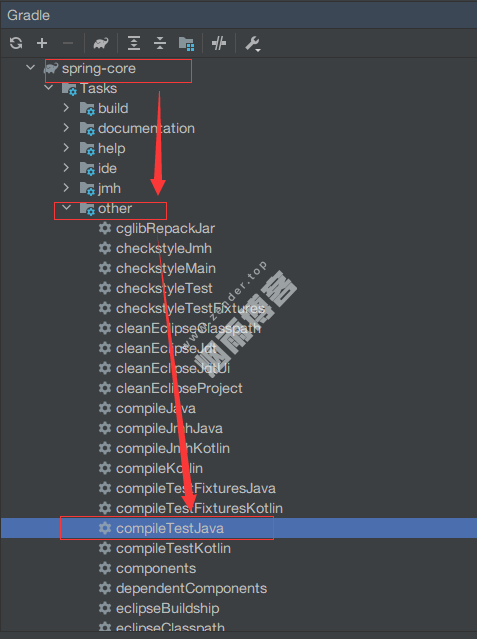
先编译spring-core模块,Gradle中找到spring-core模块,双击other中compileTestJava进行编译。
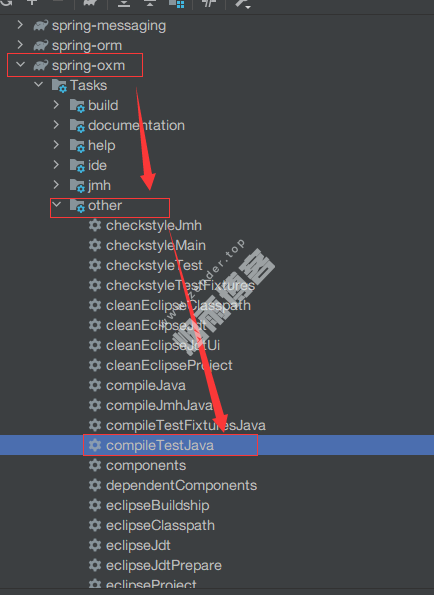
再编译spring-oxm模块,Gradle中找到spring-oxm模块,双击other中compileTestJava进行编译。
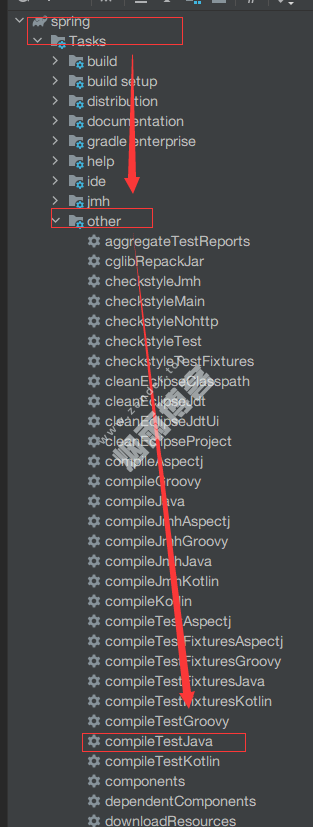
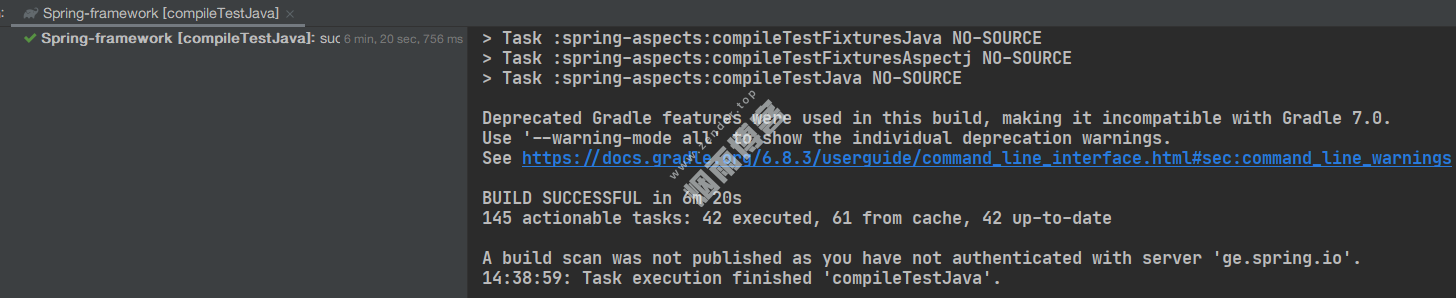
等到上述两个模块全部编译成功之后,编译整个Spring项目,同理还是从右侧选择spring项目进行整体的编译。
编译成功
版权声明
非特殊说明,本文由Zender原创或收集发布,欢迎转载。
相关文章

作者文章
- MyBatisCodeHelper-Pro3.3.6+2321破解 2年前 (2024-10-17)
- 网站迁移公告 2年前 (2024-10-10)
- Java项目防止SQL注入4总方式 3年前 (2023-09-06)
- JAVA开发小技巧--读取文件魔数来识别文件类型 3年前 (2023-08-24)
- 分类树菜单优化 3年前 (2023-08-22)
发表评论:
◎欢迎参与讨论,请在这里发表您的看法、交流您的观点。